Inside the Spectrum Icon Assistant: Three Workflows, One Smart Pipeline
Nov 21, 2025
Introduction
Adobe Designers rely on icons every day, but finding the right icon at Adobe hasn’t always been easy. With more than 20,000+ icons spread across 70+ Figma files, manually searching for the right asset can slow designers down significantly.
Meanwhile, the Icon/Brand team often spends a huge amount of time in Slack repeatedly helping others locate icons and product logos — time that could be better spent designing and evolving the system.
To solve this, we brought AI-powered icon discovery directly into Slack, where designers already collaborate. This blog introduces the three new workflows now available inside Slack, along with a high-level data-flow diagram that powers the experience.
Overview of the three AI workflows
We introduced three complementary workflows to help designers find icons in the way that feels most natural:
-
Find icon by text — describe what you need using natural language
-
Find icon by image — upload a screenshot to search visually
-
Ask a question — ask general icon usage questions powered by Agentic reasoning
Workflow demo: Find icon by text
The first workflow lets you describe an icon using semantics, visual cues, or both.
How it works
- Click Find icon by text in Slack.
- Fill in “Icon represents” and/or “Icon shows.”
- AI searches thousands of icons and returns the top matches.
- Each result includes a preview and a deep link to Figma.
Workflow demo: Find icon by image
The second workflow lets you search for icons using a screenshot.
How it works
- Upload a screenshot (drag-and-drop, paste, or file picker).
- AI compares your image to the icon library and returns the top matches.
- Each result deep-links to the exact icon in Figma.
Workflow demo: Ask a question
Some questions are about usage, sizing, or guidelines—not a specific icon. This workflow uses AI to answer natural-language icon questions.
How it works
- Ask any icon-related question in the dialog.
- Optionally include context to help the assistant interpret intent.
- AI performs multi-step reasoning and returns a consolidated answer.
- If relevant, the assistant automatically performs an icon lookup as well.
- Responses include reference links for deeper reading.
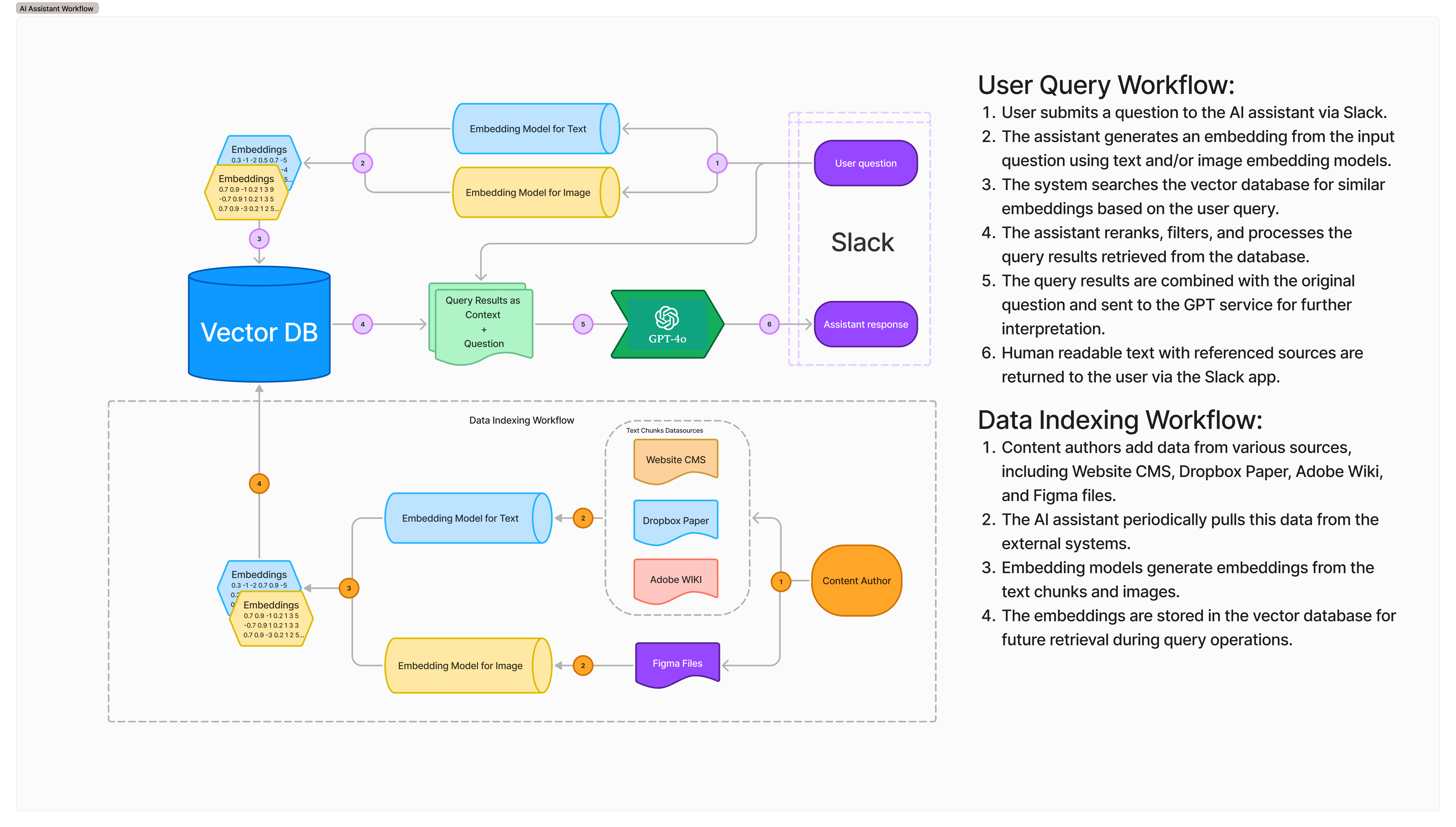
The AI data flow behind the scenes
All workflows run on the same high-level AI data pipeline.
Data flow diagram
Summary
By bringing AI-powered icon search directly into Slack, designers can now:
- find icons faster
- avoid manually searching across dozens of Figma files
- get reliable answers about icon usage
- stay focused in their existing workflow
For the Icon team, these workflows significantly reduce repetitive support tasks — freeing them to focus on higher-impact design work.