Structured Input Showdown: How AI Coding Tools Collect User Preferences
Beyond 'Type 1 for Yes, 2 for No'
Apr 03, 2026
Introduction
AI coding agents are remarkably good at writing code. But when they need to collect your preferences — which framework to use, what features to include, how to configure a project — most fall back to the oldest trick in the book: numbered lists in chat. "Type 1 for React, 2 for Vue, 3 for Svelte." This works, barely. Users mistype, agents misparse, and multi-select is essentially impossible.
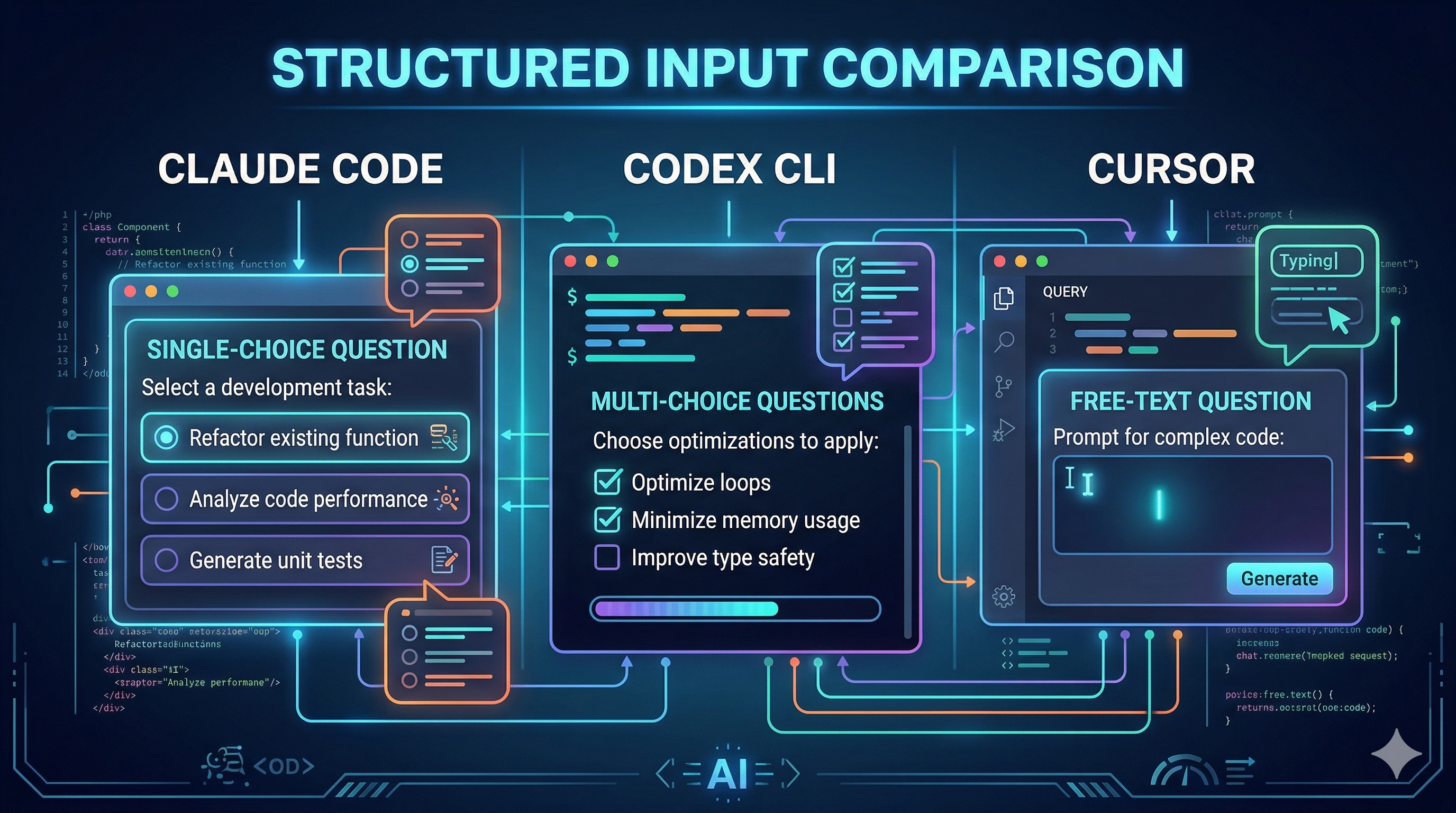
A handful of tools have started to change this. They offer structured input — native UI components with clickable options, multi-select checkboxes, and even preview panes — so agents can ask questions the way a form would, not the way a chatbot would. I built a benchmark to compare three of them, and what I found was both impressive and revealing.
What Is Structured Input?
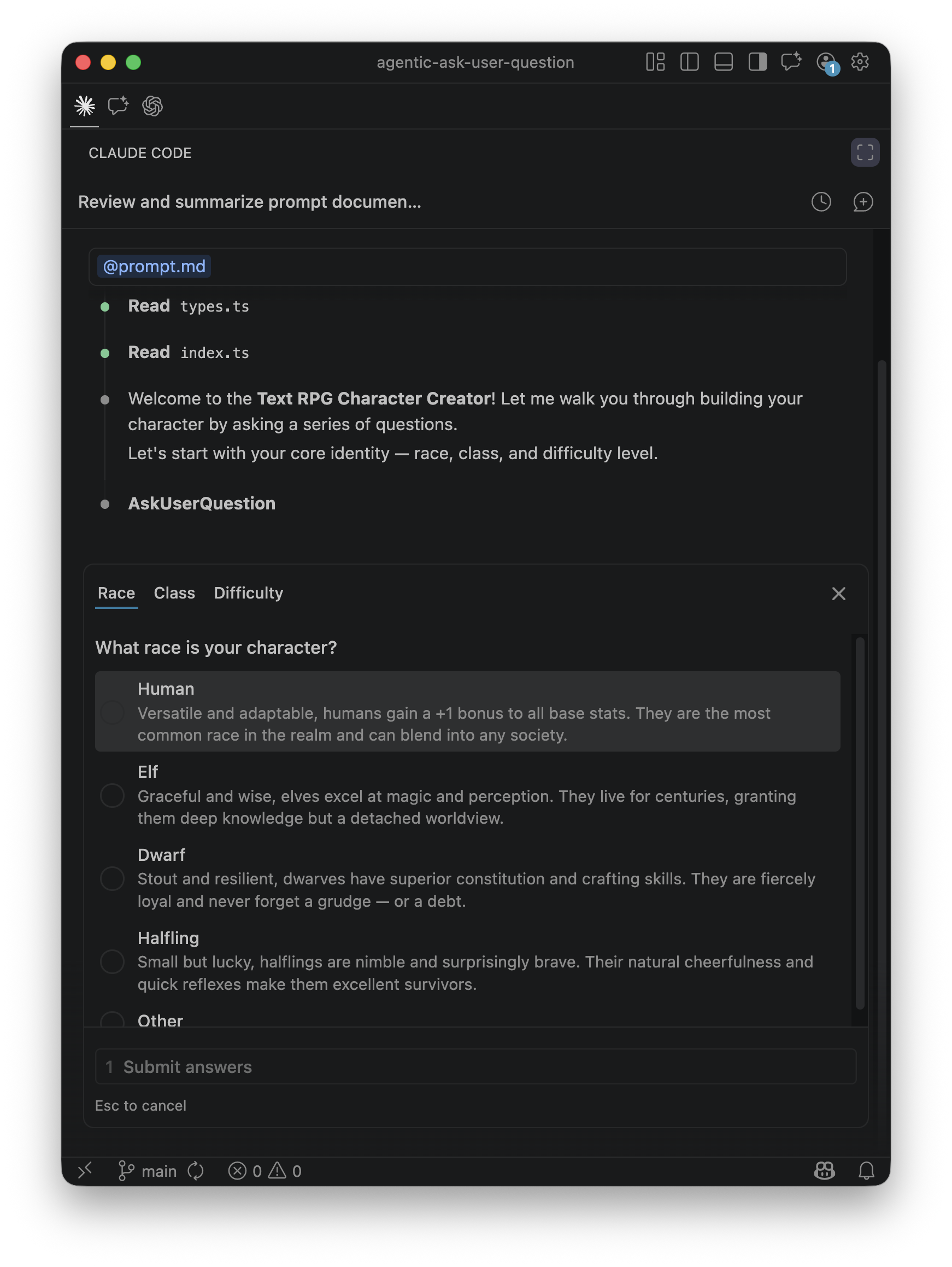
Structured input means the AI agent uses a dedicated tool to present the user with a UI widget — radio buttons for single-choice, checkboxes for multi-select, text fields for free-form input — instead of printing options as plain text in the chat stream. The agent calls a tool like AskUserQuestion, the IDE renders a native component, and the response comes back as typed data rather than a string the agent has to parse.
Why does this matter? Fewer parsing errors. Faster interaction. Type-safe responses. And critically, support for multi-select — something chat-based numbered lists simply cannot handle reliably.
Here is what it looks like in practice — Claude Code presenting a single-choice question with tabbed navigation and rich option descriptions:
Today, three major AI coding tools offer some form of this capability:
AskUserQuestionask_user_questionAskQuestionThe Benchmark
To stress-test these tools, I built a Text RPG Character Creator — a TypeScript project where the AI agent must ask the user 12 character creation questions before writing any code. The questions are deliberately designed to push limits: they start with basic single-select (race, class, difficulty), escalate to multi-select (skills, traits, companions), introduce 100+ word option descriptions, and finish with questions that have 6–8 options — exceeding some tools' documented maximums. Each IDE gets its own config file (CLAUDE.md, AGENTS.md, .cursorrules) with tool-specific batching strategies. Fork the repo and try it yourself.
What I Learned
The most surprising discovery was that the LLM rewrites your prompts. Even though the benchmark specifies exact question text and option descriptions in the prompt, what the user actually sees is filtered through the model. Claude Code summarizes and abbreviates long descriptions to fit its UI constraints. Codex takes this further — it often strips question content down to bare keywords, showing only a terse label where the prompt had a rich paragraph. The structured input tool defines the shape of the interaction, but the model decides the content. Your carefully crafted copy is a suggestion, not a guarantee.
The multi-select gap was equally revealing. Here is Claude Code's checkbox-style multi-select — the feature that other tools struggle with:
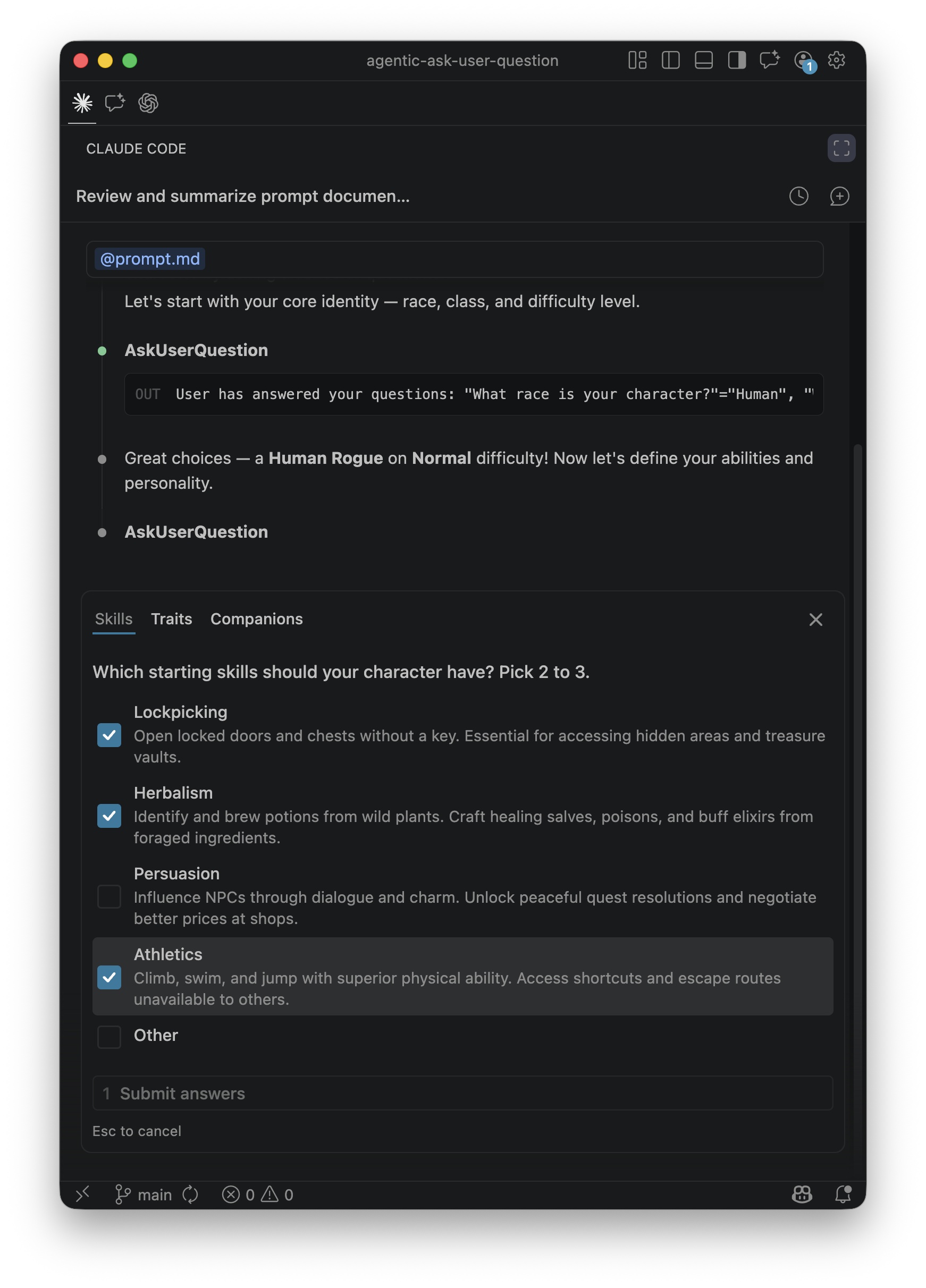
Codex CLI does not currently support multi-select questions, so when the prompt says "pick 2–4 skills," the agent gets creative: it asks the same question repeatedly as single-select, filtering out previous choices each time, until the minimum count is met. Clever — but it exposes a subtle bug. If the instruction says "pick 2–4," users can only ever select exactly 2, because the agent stops asking once the floor is reached. The user never gets the chance to pick 3 or 4. It is strict instruction-following that produces a correct-looking but functionally limited result.
There is also a shared constraint: both Codex and Cursor restrict structured input to plan mode only. In default/agent mode, these tools are simply unavailable. Community members on both platforms have already filed requests to extend support to all modes — a sign that developers want this capability everywhere, not just during planning.
Stepping back, Claude Code offers the most complete implementation today: multi-select, markdown preview panes, batching up to 4 questions per call, and auto-appended "Other" options. But it caps at 4 options per question, forcing creative splitting when a question has more. Codex is flexible on option counts but lacks multi-select entirely. Cursor's multi-select exists but is counterintuitive to use. And all three are ad-hoc implementations — each tool invented its own schema, its own constraints, its own UI rendering. There is no shared standard.
What Convergence Might Look Like
The ad-hoc status quo won't last. Google's A2UI offers one vision: a declarative, platform-agnostic protocol where agents send UI specifications — checkboxes, date pickers, forms — instead of text, and clients render them from a trusted component catalog. CopilotKit's AG-UI is exploring similar territory. Anthropic's MCP could evolve to include UI primitives as a tool response type.
Which standard wins matters less than the direction: structured input is more efficient, more accurate, reduces LLM round-trips, and saves tokens. The current tools prove the demand. An open standard will follow.
References
- agentic-ask-user-question — Companion benchmark repo
- Claude Code Tools Reference
- Claude Code AskUserQuestion Discussion (#10346)
- Reddit: Hidden Gem in Claude Code v2.0.21
- Codex CLI Structured Input Proposal (#9926)
- Cursor Forum: AskQuestion Tool Discussion
- Google A2UI: An Open Project for Agent-Driven Interfaces