Figma ➜ Finetuned SigLIP2 ViT Icon Encoder
Lessons from Finetuning an Icon Encoder End-to-End (Part 3)
Dec 26, 2025
Introduction
In Part 1, we covered the pipeline from Figma to clean, theme-correct PNGs. In Part 2, we built high-quality captions at scale using LLMs and VLMs, and reviewed the dataset with Gradio tools.
This blog post focuses on the finetuning and evaluation of SigLIP2-NaFlex for icon retrieval, including base-model choice, input augmentations driven by real user queries, a practical Transformers training skeleton, and a leak-free unseen-caption eval set.
1. Hardware & Why Training Is Feasible (for this task)
This project is finetuning (not pretraining), so feasibility is mainly about running stable, repeatable experiments fast enough to iterate.
1.1 Training Rig (relevant specs only)
- GPUs: 8 × RTX 3090 (24GB each) → 192GB total VRAM
- Launcher:
torchrun(one process per GPU) - Distributed strategy: DDP-style data parallelism (gradients synchronized across GPUs each step)
- Precision: mixed precision (fp16)
- Gradient accumulation:
gradient_accumulation_steps = 1(i.e., no accumulation)
1.2 Input resolution makes the workload batch-friendly
All training images are 224 × 224 PNGs. At this resolution, a single 24GB GPU can typically sustain a non-trivial per-GPU batch, and scaling to 8 GPUs is straightforward.
With gradient_accumulation_steps = 1, the global batch is:
1.3 Why batch size is not the make-or-break factor here
One of the practical advantages of the SigLIP-style pairwise sigmoid objective is that it is less dependent on extremely large batches than softmax-normalized contrastive training. The SigLIP study notes that with the sigmoid formulation, performance benefits from batch size saturate much earlier than with softmax. It performs better at smaller batch sizes and shows diminishing returns once batches get 'reasonably large.'
Since SigLIP 2 builds on the original SigLIP objective recipe, this property is an important part of why a setup like mine can still be a practical finetuning environment for retrieval.
2. Base Model Choice: Why NaFlex (vs FixRes)
SigLIP 2 ships in two practical “input geometry” flavors:
- FixRes: fixed-resolution, square-input behavior (and designed to be backward compatible with the original SigLIP architecture).
- NaFlex: a native-aspect-ratio, variable-resolution variant that supports multiple resolutions while preserving the input image’s aspect ratio.
2.1 What NaFlex buys you for retrieval
In icon search, aspect ratio is not a cosmetic detail — it changes what information survives preprocessing. A fixed-square pipeline often implies either:
- distortion (stretching a non-square query), or
- aggressive center-crop (dropping context).
NaFlex is explicitly motivated as a way to reduce this kind of aspect-ratio damage, and the SigLIP 2 paper highlights it as a path to improve aspect-sensitive applications (e.g., document understanding).
2.2 Why I chose NaFlex
The decision was primarily driven by observed user behavior: designers frequently submit non-standard dimensions (cropped screenshots, odd aspect ratios, composites) as query images.
Given that input distribution, NaFlex is the conservative engineering choice: it is designed to handle variable aspect ratios and resolutions without forcing everything into a square.
Separately, the SigLIP 2 paper already reports that NaFlex outperforms the standard variant on the majority of retrieval benchmarks, particularly where aspect ratio distortion tends to be more harmful.
Training uses fixed 224×224 for throughput and stability, but I chose a NaFlex base to keep the encoder architecture aligned with variable-aspect inference queries.
3. Targeted Augmentations: Blur/Pixelation Driven by Real Queries
Real-world icon queries are often screen captures — cropped from lower-resolution monitors, resized by apps, and visually degraded. These low-quality inputs were a frequent failure mode in earlier CLIP finetunes, so I targeted the input degradation directly in training.
3.1 The augmentation policy (minimal, explicit, and probabilistic)
I implemented a small augmentation hook that optionally applies one of two degradations:
- Downsample → Upsample (a controlled way to simulate low-resolution capture and blocky artifacts)
- Gaussian Blur (to simulate defocus/motion/soft captures)
Both are applied probabilistically, so the model still sees clean images most of the time, but is regularly exposed to realistic degraded variants.
3.2 Implementation (the exact logic)
def _maybe_augment(self, image: PILImage.Image) -> PILImage.Image:
    """Apply optional blur or downsample-upsample augmentations."""
    if self.downsample_prob > 0 and random.random() < self.downsample_prob:
        scale = random.uniform(self.downsample_min_scale, 1.0)
        if 0 < scale < 1:
            width, height = image.size
            down_w = max(1, int(width * scale))
            down_h = max(1, int(height * scale))
            if down_w > 1 and down_h > 1:
                image = image.resize((down_w, down_h), PILImage.NEAREST)
                image = image.resize((width, height), PILImage.BICUBIC)

    if self.blur_prob > 0 and self.blur_radius > 0 and random.random() < self.blur_prob:
        image = image.filter(ImageFilter.GaussianBlur(radius=self.blur_radius))

    return image
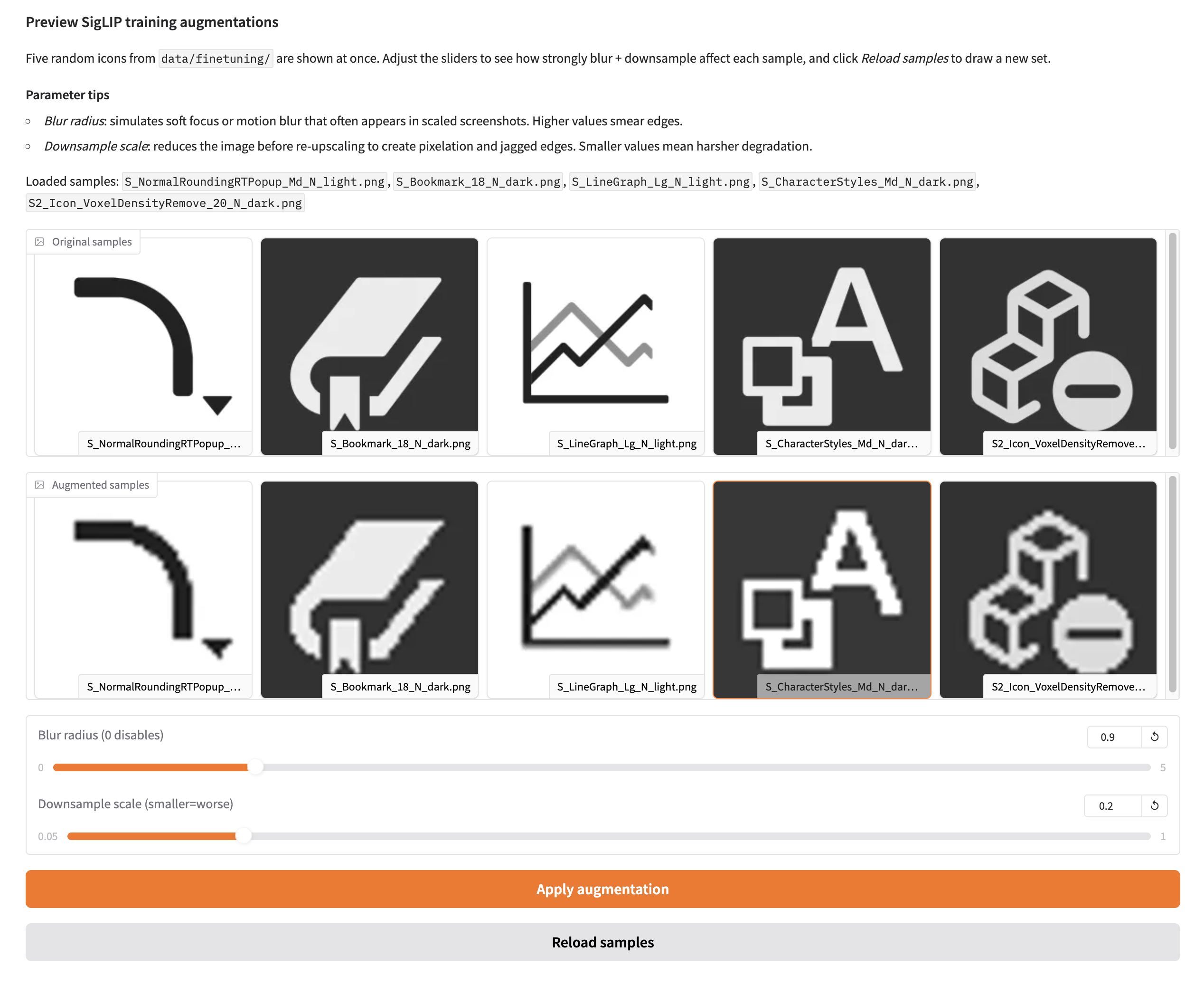
3.3 Verifying Augmentations with Gradio
I vibe coded a minimal Gradio app to visually verify these probabilistic augmentations before training.
4. Training Skeleton in Transformers (and One Confusing Pitfall)
I used the latest Transformers training stack with minimal custom code. The only core pieces I needed were:
from transformers import Siglip2Processor, Siglip2Model, Trainer, TrainingArguments4.1 The skeleton
The training entrypoint does four things:
- Build train/eval datasets (prepare_datasets)
- Load processor + model
- Configure TrainingArguments
- Train with a custom collator (+ optional retrieval eval callback)
processor = Siglip2Processor.from_pretrained(args.model_name, use_fast=False)
model = Siglip2Model.from_pretrained(args.model_name, attn_implementation="sdpa")
4.2 TrainingArguments (only the non-obvious bits)
- remove_unused_columns=False to preserve image/caption fields needed for contrastive training
- mixed precision via fp16/bf16
- ddp_find_unused_parameters=False to avoid DDP overhead/warnings
- gradient_accumulation_steps=1 (no accumulation)
For more details, please refer to the training report.
4.3 Collator + retrieval metrics
All task-specific behavior lives in the collator:
- tokenization + image preprocessing
- probabilistic blur and downsample → upsample augmentations
4.4 Eval callback: frozen unseen-caption eval set (gpt-oss-120b)
To avoid text leakage while keeping evaluation fully comparable across checkpoints, I use a pre-generated and frozen unseen-caption eval set.
-
Offline build (once): randomly sample 500 icons from the 20,000+ training set. For each icon, feed its original training captions to gpt-oss-120b (reasoning effort = High) and ask for 3–5 new captions that describe the icon accurately but are clearly different from the originals. The model is instructed to self-check for overlap.
-
Leakage guard: compare generated captions against the original captions using edit distance. If similarity exceeds a threshold, regenerate (up to 3 retries). In my testing, only reasoning effort = High produced consistently reliable “unseen” captions at scale.
-
Freeze: write the resulting pairs to a versioned JSONL file (e.g.,
data/metadata/eval_t2i_i2t.jsonl). This file is treated as immutable during training. -
In-training eval: during finetuning, a custom
TrainerCallbackloads the same frozen JSONL and runs retrieval evaluation at a fixed interval (every 100 steps, aligned with checkpoint saves). Metrics are logged to TensorBoard — see the training report.
Note: the frozen 500-icon unseen-caption eval set is only used for checkpoint monitoring during training. The Postgres + pgvector benchmark in Section 5 is run by a separate harness with a different query set (2,968 queries, evenly split across tasks).
5. Benchmark
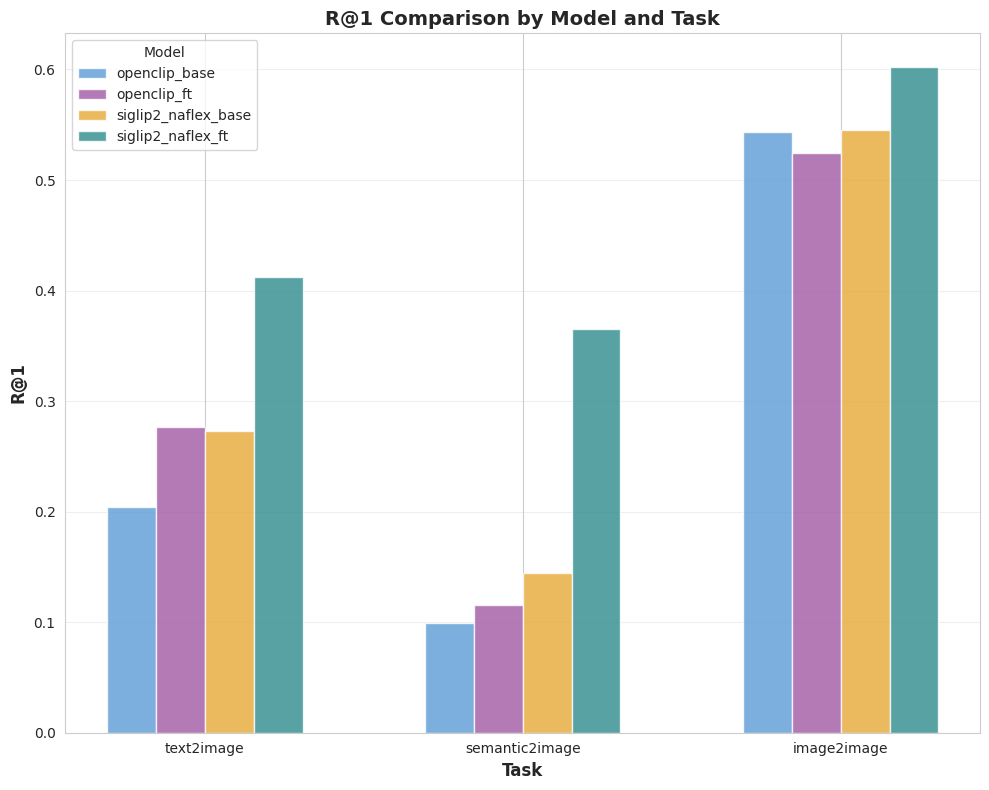
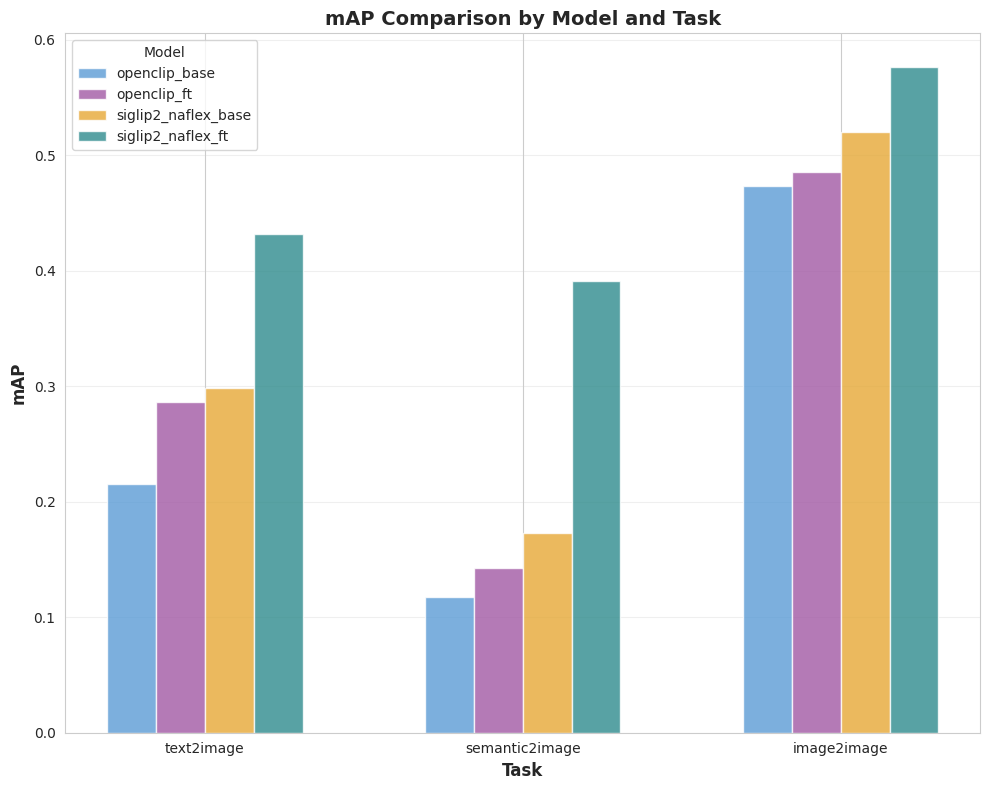
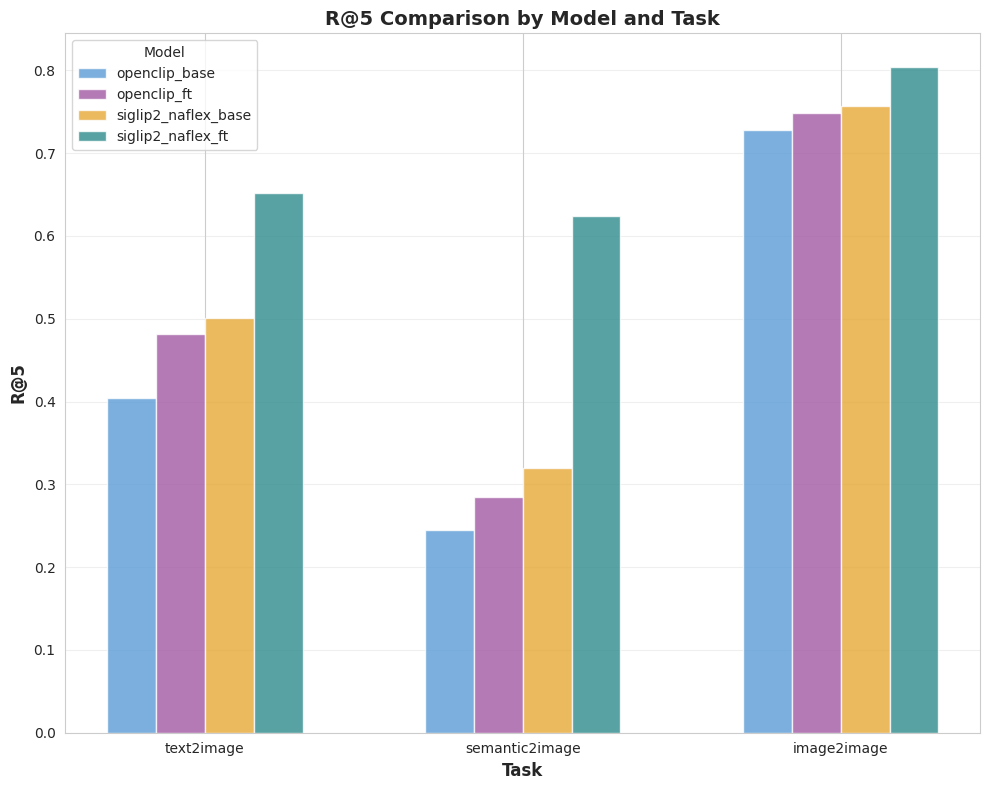
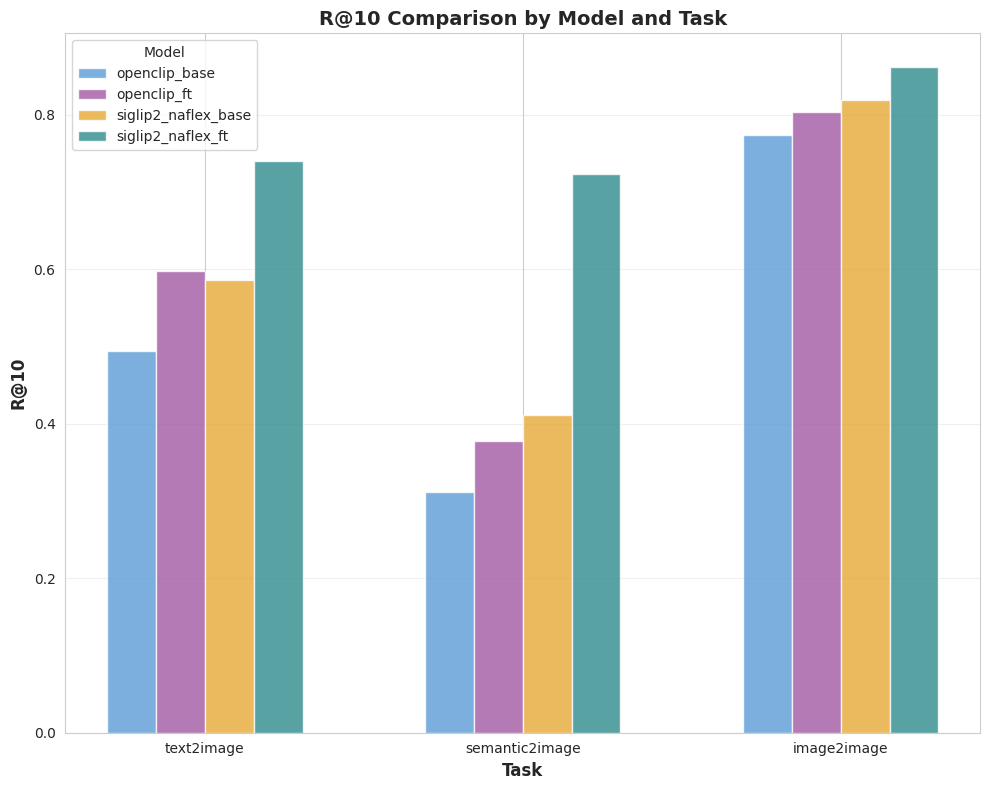
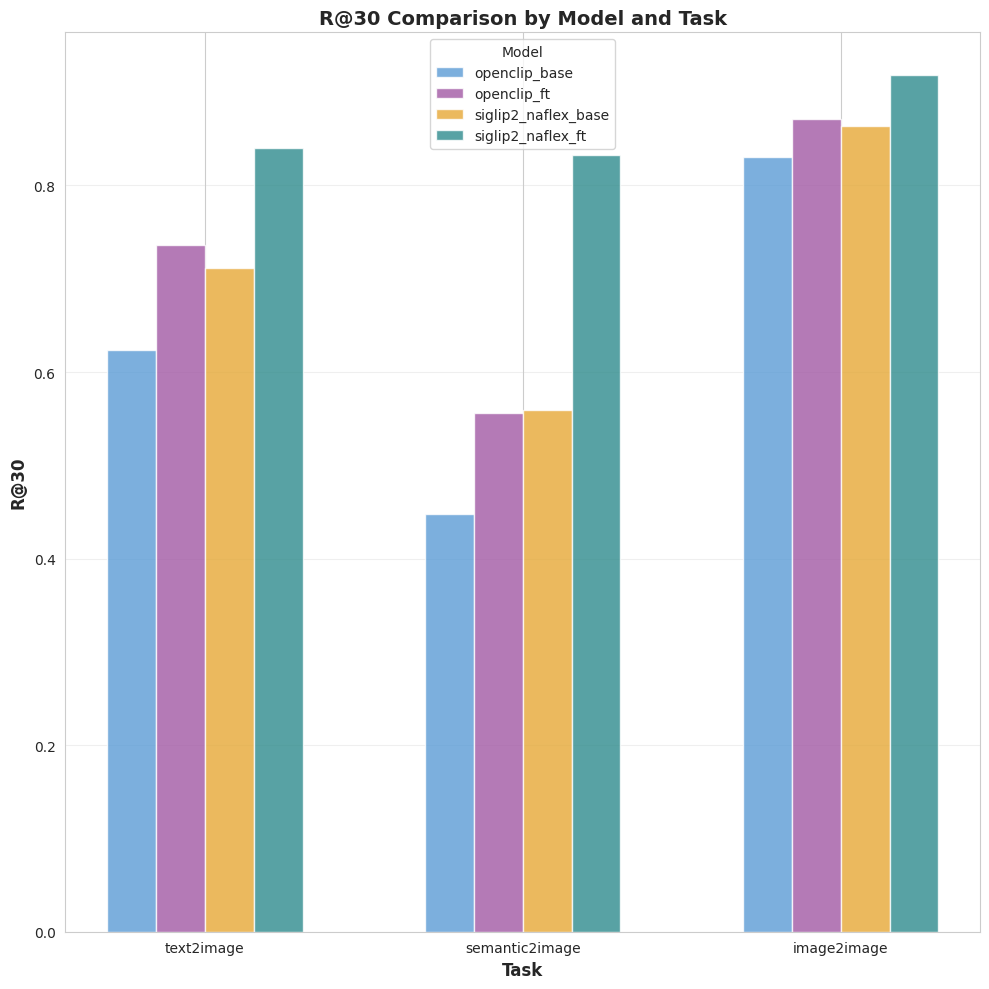
The goal of this benchmark is simple: measure retrieval quality across four models (base, finetuned) and three tasks (text2image, semantic2image, image2image).
5.1 Benchmark setup (production-realistic)
This benchmark is executed by a separate harness (independent from the in-training callback in Section 4.4) to approximate production query behavior on a real PostgreSQL + pgvector stack.
- Each model produces embeddings for the full icon corpus and writes them into Postgres.
- Queries run against the same HNSW index setting (
ef_search = 80) for apples-to-apples comparisons. - The benchmark uses a fixed query set of 2,968 queries, evenly split across the three tasks.
- I report quality metrics (Recall@K, mAP) per benchmark run.
Tasks in the raw data map as follows:
- text2image: user describes the icon's visual appearance (e.g., "a gear with six teeth") to find matching icons.
- semantic2image: user describes the action or abstract meaning the icon represents (e.g., "settings", "configuration"). This is the primary target scenario for this finetune, so I pay extra attention to it.
- image2image: user uploads a screenshot and searches for visually similar icons in the corpus.
5.2 Results overview
Four ViT encoders are evaluated:
A compact snapshot (R@1 / mAP):
Key takeaway: the SigLIP2 NaFlex finetune improves quality across all tasks, with the largest gains on the two text-driven benchmarks built from unseen captions.
5.3 Plots (full metrics)
6. Conclusion
This finetuning run validated that SigLIP 2 NaFlex is a highly efficient backbone for icon retrieval. By switching from a Large OpenCLIP model to a Base SigLIP 2 model, we achieved a 40%+ improvement in Recall@1 on semantic queries.